ABFut

EA FC 27 · Ultimate Team

Your filters.
Running
while you sleep.

ABFut runs your transfer-market filters on the EA Web App, buys under your limit, lists at a sensible price, and keeps score. On iPhone, Android and Chrome.

★★★★★ 4.7 on the App Store Free to start · Premium removes ads
Market index
Index 100 · 145.74▼ 6.72%Index 86 · 69.42▼ 4.04%Index 85 · 114.05▼ 2.49%Index 84 · 92.22▲ 3.24%Index 83 · 128.99▲ 1.30%Index 82 · 131.62▼ 1.49%Index 81 · 151.27▲ 1.54%Index Icons · 44.99▲ 1.23%Index 100 · 145.74▼ 6.72%Index 86 · 69.42▼ 4.04%Index 85 · 114.05▼ 2.49%Index 84 · 92.22▲ 3.24%Index 83 · 128.99▲ 1.30%Index 82 · 131.62▼ 1.49%Index 81 · 151.27▲ 1.54%Index Icons · 44.99▲ 1.23%Futbin · 23/09 03:58 UTC

What it does

Built for the transfer market

Every number is yours: the price you buy under, the price you sell at, how long it runs. ABFut does the repetitive part.

Autobuyer

Set it, start it, walk away

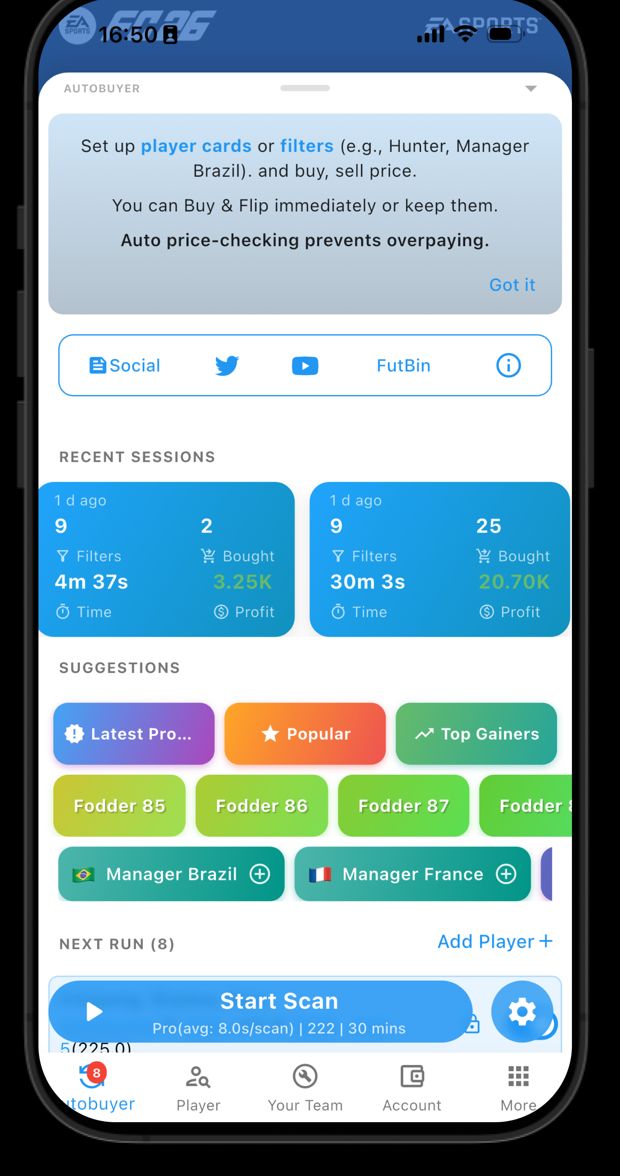
Add player cards or filters — a Hunter, a Brazil manager, 85-rated fodder — with a buy limit and a sell price. Start the scan and ABFut searches, snipes and bids for you.

  • Buy-now sniping and auto-bidding with your own price caps
  • Auto-sell lists what you bought; unsold cards are relisted
  • Live timer, profit and search count while it runs
  • On Android, press Home and a small window keeps showing progress
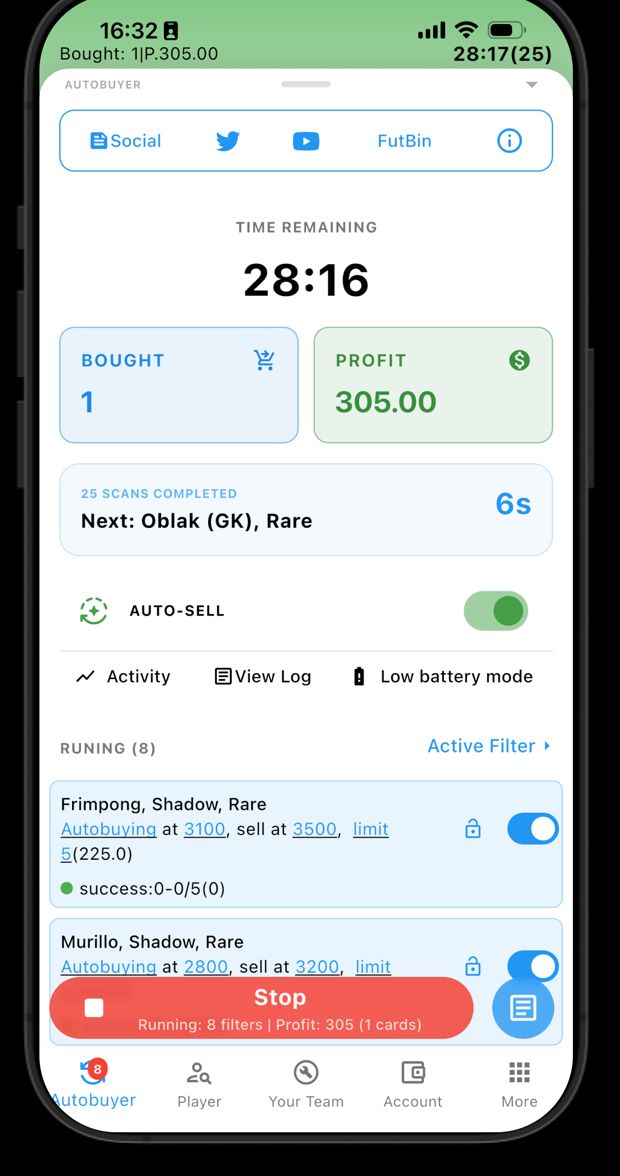
ABFut autobuyer running: time remaining, cards bought and profit

Market data

Know what a card is worth

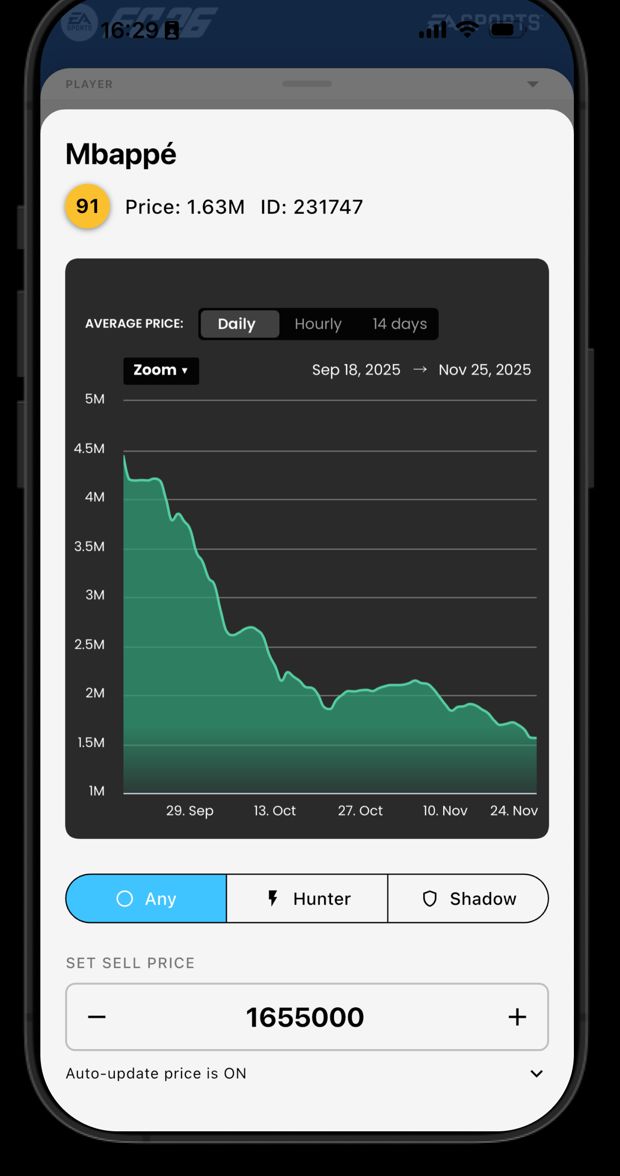
Live community prices with rating, version and club, a market index, and ready-made lists — Trending, Icons, Meta, Under 50k.

  • Price history charts, daily and hourly
  • Lowest-BIN tracking and price-rise alerts
  • Cards that match none of your filters are priced from the live market before listing
Card price history chart for Mbappé

SBC builder

Fill a challenge from your own club by target rating, TOTW count or card quantities. Untradeables and storage first.

SBC solutions

Community solutions for each challenge, with the cost on your platform. Tap one to fill the squad.

The Wall

Post pulls, ask for squad help, follow traders. Newest first — nothing gets buried by an algorithm.

On desktop

The same tools, in Chrome

The ABFut extension adds the autobuyer, SBC builder and solutions straight into the EA Web App on your computer. Your EA password stays with EA — it is never sent to us.

  1. Install the extensionFrom the Chrome Web Store, one click.
  2. Open the EA Web AppSign in to your EA account as usual.
  3. Link Premium from the appSign in to ABFut on your phone and link your EA account once.

Plans

Free to start

The feed, player prices and search stay free for everyone. Premium removes ads and unlocks the advanced trading tools — and one subscription works on iPhone, Android and Chrome with the same account.

Free

Everything you need to watch the market

  • Live card prices, lists and search
  • Price history charts
  • The Wall and daily EA FC news
  • Autobuyer — watch a short ad to start each session

Premium

Subscribe through the App Store or Google Play

  • No ads anywhere in the app
  • Start the autobuyer instantly, no ad breaks
  • The advanced trading features
  • Chrome extension access with the same account

Questions

Good to know

Does ABFut guarantee profit?

No. ABFut automates the searches, bids and listings you configure. Market prices move, and every price limit is your decision.

Do I give ABFut my EA password?

No. You sign in to EA inside the EA Web App itself. ABFut stores only the EA account name you choose to link, so Premium works in the Chrome extension.

I subscribed on iPhone. Does Premium work on Android?

Yes — sign in to ABFut with the same account on both devices. If you subscribed as a guest, add an email to your account on the iPhone first.

How do I cancel?

Subscriptions are handled by Apple or Google: Settings › Apple ID › Subscriptions on iPhone, or Play Store › Payments & subscriptions on Android.

Something isn't working

See the support page or email diego10bk@gmail.com.