 ABFut
ABFutScan hands-free: keep ABFut running in a floating window
Start a scan, leave the app, and ABFut keeps scanning in a small floating window that shows bought cards, profit and the next filter.
A scan used to mean leaving ABFut open on screen and not touching the phone. It no longer does. Start a scan, swipe home or switch apps, and ABFut shrinks into a small floating window that keeps scanning while you do something else.
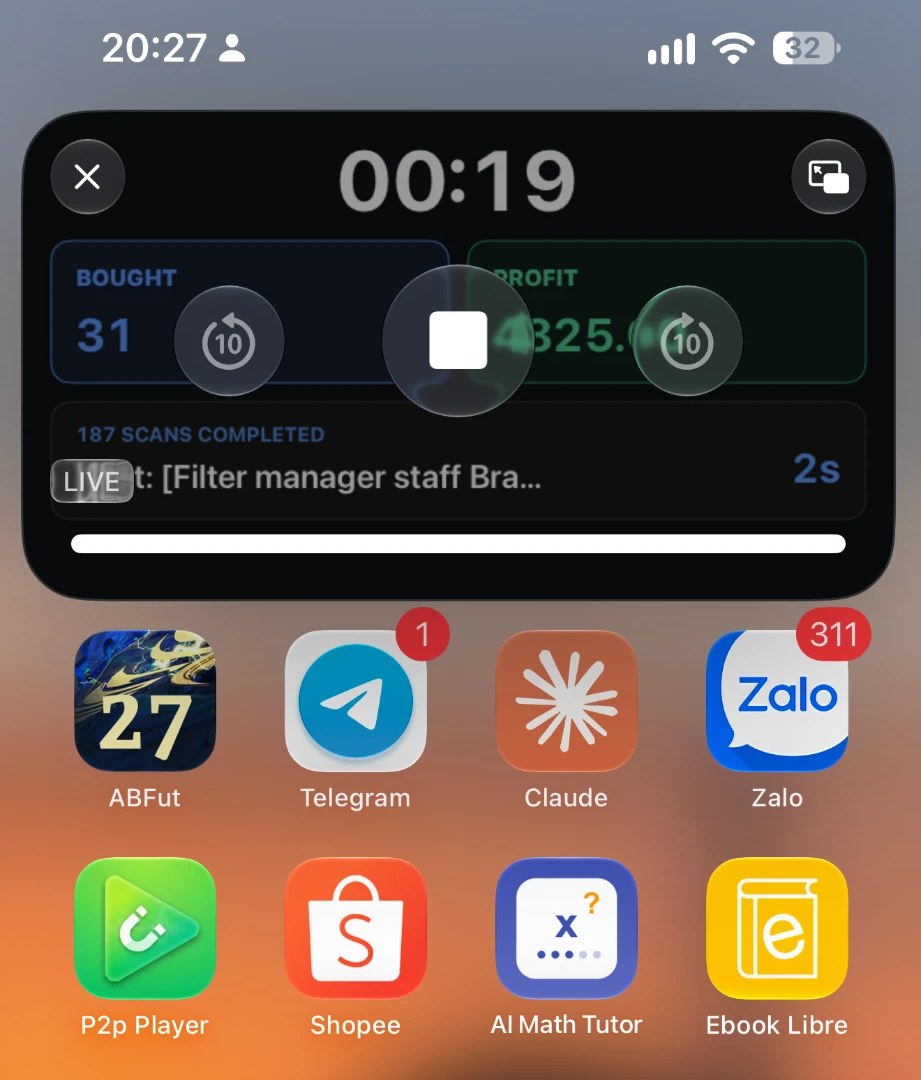
What the window shows
- How long the session has been running.
- Bought: cards bought so far.
- Profit: green when you are up, red when you are down — the same colours as in the app.
- Scans completed, the next filter in the queue and its countdown.
- A stop button, so you can end the session without opening the app.
Watching the log instead
Open the Console Log page before you swipe away and the window shows the log lines as they arrive, eleven at a time, instead of the status screen. Useful when you are checking why a filter buys nothing. Close the log page and the window goes back to the status view.
How to use it
- Update ABFut to the latest version.
- Start a scan as usual.
- Swipe home. The window appears on its own. Drag it anywhere on screen, or push it to the edge to park it.
- Tap the window to come back to the app.
Keeping the session alive
Leave the phone unlocked with the window on screen while the session runs. The window is what keeps the scan awake in the background; locking the phone or closing the window stops the work, and ABFut stops the session rather than pretending it is still going.
On iPhone, Picture in Picture must be allowed in Settings → General → Picture in Picture. On Android the whole app shrinks into the system's own picture-in-picture window.
Questions people ask
Can ABFut keep scanning while I use another app?
Yes. Start a scan and leave the app: ABFut shrinks into a small floating window that keeps scanning, showing elapsed time, cards bought, profit, scans completed and the next filter, with a stop button. Tap the window to return to the app.
Does the scan keep running when the screen is locked?
No. Keep the phone unlocked with the floating window on screen. Locking the phone or closing the window ends the session, and ABFut stops it properly instead of leaving it half-running.
The floating window does not appear on my iPhone. What do I check?
Make sure Picture in Picture is turned on in Settings, General, Picture in Picture, and that ABFut is updated to the latest version. The window opens by itself when you leave the app during a scan.